Product Update
Blog2Video just learned four new tricks
One stickman, one tricycle, one cape. Custom templates rebuilt and editable, auto font size, more scene variants across six templates, and Avatars, now live.
One stickman, four new tricks
We shipped four things this month. To introduce them we made another stickman video. He rides in on a tricycle, paints, flies a kite, plays the flute, and ends by putting on a cape and flying off. Here is what each of those scenes is about.
- 0:00 Four new tricks
- 0:10 Trick one: custom templates, rebuilt & editable
- 0:34 Trick two: auto font size
- 0:53 Trick three: more scene variants
- 1:09 Trick four: Avatars (+ private sign-in)
- 1:29 Up, up and away: blog2video.app
1. Custom templates, rebuilt and now editable
Custom templates let you turn your brand (your website, a prompt, or a brand document) into a video template of its own. We've rebuilt how those templates are made.
Custom template creation now runs on a brand new generation harness. We tested it against the old one internally, and people rated its videos 27% higher. The share of videos that got a zero rating dropped as well. That second number matters to us just as much: the new harness raises the average and also produces far fewer videos that miss completely.
Every custom template is now fully editable, too. When the generated template is close but not quite right, you don't need to start over. Open it and change the colors, fonts and layouts yourself, as often as you like. In the video, that's the stickman's second coat of paint: he repaints the canvas and the template changes color with it.
2. Auto font size
Long headlines used to be the easiest way to break a scene: a title that looks fine in the editor can spill over the edge or get cut off in the final render.
Now, text in templates sizes itself to fit. Write a long headline and the font scales down until it fits its frame. It takes both the screen the video plays on and your preferred proportions into account, so the same headline fits a landscape video and a portrait one. Nothing spills and nothing gets cut off. In the video, the headline keeps getting longer and fits both frames the whole time.
3. More scene variants, and six refreshed templates
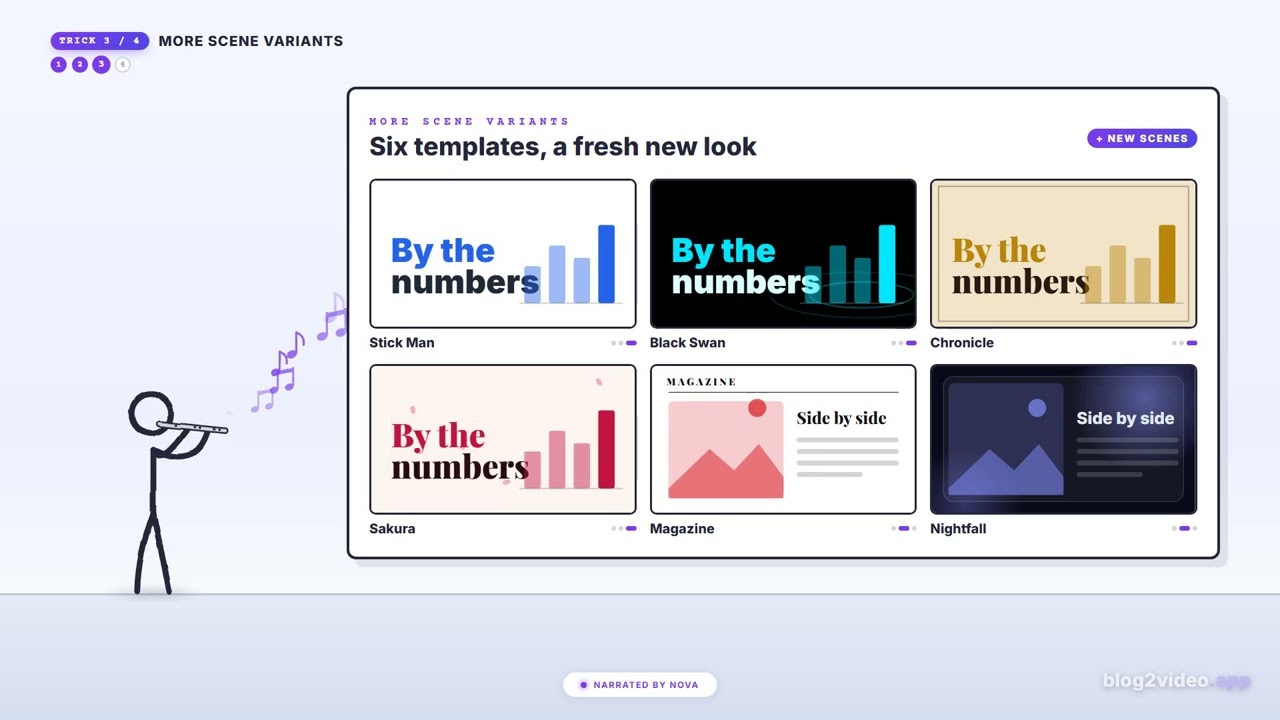
Six templates have a fresh new look:
- Stick Man: hand-drawn figures on a clean page
- Black Swan: neon cyan on black, with water ripples
- Chronicle: a parchment history book with drop caps and quill-style text
- Sakura: washi paper, crimson accents and falling blossoms
- Magazine: print editorial with serif headlines and a single red accent
- Nightfall: dark cinematic glass with neon-glow data
More ways to lay out every scene
Each of them also has more scene variants, so there are more ways to lay out a title, a split image-and-text scene, or a set of numbers. That makes it easier to find a layout that suits each part of your story, and a long video repeats itself less. (In the video, the stickman plays the flute and each note brings one of the templates on screen.)
4. Avatars are live
Avatars are out of beta. Upload a photo and it becomes your presenter, speaking your script, lip-synced to the narration in every scene. You can also pick one of our presenters.
Also new: a private sign-in
You can now sign in with just your email and a password. We confirm your address with a 6-digit code sent to your email. Google sign-in still works exactly as before, but you no longer need a Google account to use Blog2Video.
Try them
All four are live now at blog2video.app. Paste in a blog post, choose one of the refreshed templates (or build your own and edit it), give it a long headline, add an avatar, and see what you get.
Go make something worth watching.
Made with love by Firebird Technologies.
How we made the video
The video is built entirely in Remotion (React): every frame is code, with no stock footage and no AI video generation. The narration is ElevenLabs ("Nova"), over the same music bed as the rest of the stickman update series.
The stickman is the same shared character from our earlier update videos. For this one we taught him to ride a tricycle (the pedals turn exactly as fast as the wheel rolls), play the flute, and take off with one fist raised. Every cut between scenes moves the camera upward, so the video climbs from the stage to above the clouds. It ships in landscape (1920×1080) and portrait (1080×1920) from one composition.
Frequently Asked Questions
What changed in Blog2Video custom templates?
Custom templates are now generated on a brand new harness. In internal testing, people rated its videos 27% higher and far fewer videos got a zero rating. Every custom template is also fully editable: you can change its colors, fonts and layouts whenever you like.
What does auto font size do?
Text in templates now shrinks to fit its frame. It accounts for the screen the video plays on and your preferred proportions, so the same long headline fits both a landscape and a portrait video without spilling over or getting cut off.
Which templates got new scene variants?
Stick Man, Black Swan, Chronicle, Sakura, Magazine and Nightfall all have a fresh new look plus more scene variants for titles, split image-and-text scenes and numbers.
Are Blog2Video Avatars still in beta?
No. Avatars are now live for everyone. Upload a photo and it presents your script, lip-synced to the narration in every scene, or pick one of the built-in presenters.
Can I use Blog2Video without a Google account?
Yes. You can sign in with just your email and a password. Your address is confirmed with a 6-digit code sent to your email. Google sign-in still works as before.